The role of accounting in Management
| Site: | Plattform für Weiterbildung und Internationalisierung der Hochschule Weihenstephan-Triesdorf |
| Course: | Entrepreneurship in Food |
| Book: | The role of accounting in Management |
| Printed by: | Gast |
| Date: | Sunday, 26 July 2026, 4:57 AM |
Description

1. Introduction
There is a difference between financial and managerial accounting. What was discussed in topic 11 on Business Financing
concerned the financial accounting. This is done by accountants, like
preparation of financial statements to present the companies financial
situation to banks, investors or the tax office. Accountants are often
external experts that are hired on a per task basis, e.g. to prepare the
accounts for the annual audit. In this topic we will look at the
importance of bookkeeping for management purposes.
Many
entrepreneurs have to do the bookkeeping themselves, as they do not yet
have the capacity to employ a bookkeeper. However, that should be one
of the first people you get on board. Many entrepreneurs struggle to put
bookkeeping systems in place and to keep up with the daily record
keeping. As soon as you lose track of your petty cash movements e.g. you
will find your company 'bleeding' money. If your cash is stuck in
unused stock or you are selling under price because you didn't get your
costing right, you will run into financial trouble very fast. To be able
to solve your problems you need to understand where they are.
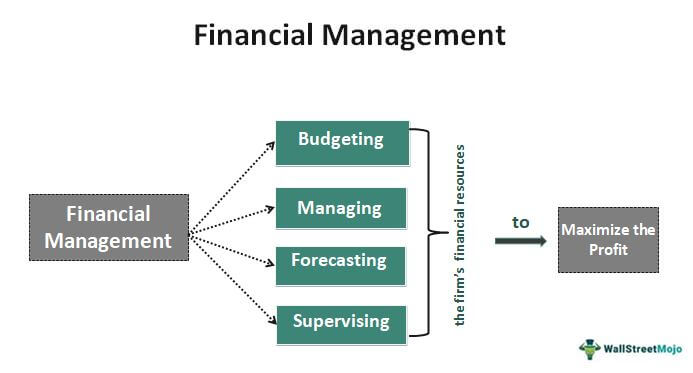
Peter Drucker once famously said:"What gets measured gets done." Financial management helps you to use your records as a management tool and to determine where you need to focus your attention. To be enable you to do that we will look at the different components of record keeping and what information they provide for your decision making.
2. Record Keeping
Besides being a legal requirement for every company, record keeping also provides a systematic record of all the financial transactions a company makes. Have you already paid a certain invoice? Have you already been paid? How much did you quote in an offer? Does it match the invoice and the payment received? How much cash did you give the driver to buy stationary? Did he return the change? Does the amount your cleaner received match the working hours? Does the material you procured cost the same as last time? Did department A receive 3 or 4 boxes of packaging materials? Does the amount of milk received match the amount of cheese produced or did a considerable amount of milk get stolen on the way? Unless you have the brain of an elephant who supposedly never forgets anything, you will be hard pressed to answer these questions in the hectic work environment that entrepreneurs usually find themselves in. Timely and systematic record keeping relieves you of the stress of having to remember all of these. Well kept records allow you to have all of these numbers at your fingertips.
3. Petty Cash
In some countries businesses still make a large number of payments in cash. In many cases also a number of persons is tasked with cash purchases of different kinds. Petty Cash Vouchers as well as handwritten receipts can be common. Tracing cash advances and payment receipts is a major accounting task in such operations. It is useful to print a petty cash voucher book that allows for easy tracing and balance reconciliation.
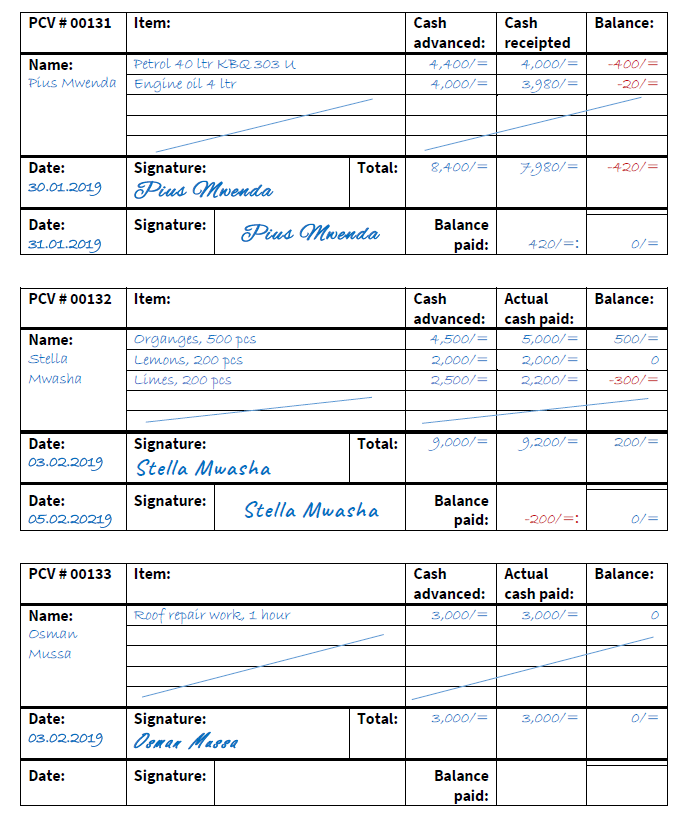
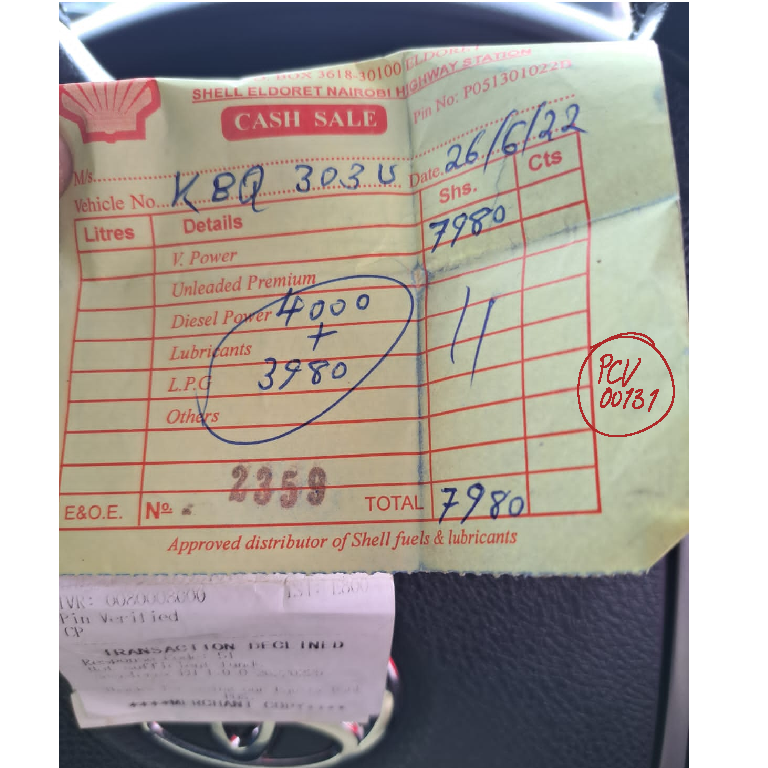
In the example above the person receiving a cash advance signs for the amount received and once the purchase is made returns the receipt(s) for the purchase. These are recorded on the same voucher and the balance payable or receivable is recorded. Once the balance is paid the person signs for it on the same voucher again and it is easily visible that the transaction was reconciled. In this way outstanding receipts and balances can be followed-up easily. The receipt is marked with the Petty Cash Voucher (PCV) number and filed in either numerical order, by date or by category. With this number it can always be easily traced back to the original cash transaction. This petty cash book or cash register should be accompanied with a daily cash log, where all cash in/out transactions for the day are recorded to check if the cash balance at the end of the day is correct. Printable templates can be found here under resources of this lesson. If for example an imprest of 500$ was received by the person handling the petty cash, at the end of the day the remaining cash balance plus the reicepted amounts must still add up to 500$.
Where mobile money options are available these are preferable to petty cash transactions as payments can be made to the exact amount (reducing the need for follow up on outstanding balances), and each transaction creates a digital receipt that is automatically recorded on a printable monthly ledger for mobile money transactions.
4. Accounting software
It is highly advisable to use an bookkeeping or accounting software for record keeping. Several simple-to-use options for small businesses and entrepreneurs are available at a low cost. You can click on the links in the text to open the websites for each of the described software options.
The most well-known is probably QuickBooks, which has many advantages but is on the expensive side among the low-cost solutions. It's use is also not particularly intuitive and beginners should attend an introductory course to get aquainted with its features. QuickBooks also offers an online app version. It's strength is in its tax categorization feature, which can be important for companies that depend on taxt write-offs.
Another software that functions as a digital petty cash system is Expensify, which is also one of the cheapest options available. It's strength is in its receipt scanning and capturing feature. It can be integrated with other accounting software.
A similar software is Zoho Expense, which also allows for receipt-scanning, is integratable and has a budgeting tool. It is the ideal choice for companies that deal with different currencies. It is also one of the cheapest alternatives available.
Another low-cost option is FreshBooks, which has a well-developed invoicing tool, to which scanned receipts can be attached. It also has the advantage of no user limit.
Xero is not a receipt scanning app like the ones above, but has some financial reporting features integrated, like P&L cash flow statements, balance sheets, etc. and also allows for payroll management.
A similar software that is competatively priced is Wave. It offers a free version for businesses that do not need the payroll feature. It's features however may be limited once a business grows and has more advanced accountingneeds.
A more sophisticated but user-friendly solution with scalable features is Sage. But it is slightly on the pricier side and might therefore not be the first choice for start-ups.
MarginEdge is an accounting software that is gearded towards restaurant start-ups. Its strength is in providing real-time information to identify areas of inefficiency, but like QuickBooks, it needs some learning how to use it properly.
Kashoo offers two different version, one that offers double-entry accounting and another one that just helps start-ups stay on track with their bookkeeping. It is one of the more intuitive and user-friendly softwares, but has limitations on the integration and compatibility with other systems.
It is advisable to check out several systems that offer free trials to see if they fit your bookkeeping or accounting needs and usability, before deciding on subscribing to a plan.
5. Double-entry
A concept that most entrepreneurs struggle with, is double-entry bookkeeping. If you just get started and have very few or only cash based transactions to record, you may work with a general ledger and just enter each transaction once. This is called a journal entry. This can be done on excel or google sheets.
However, as soon as you need to keep track of several accounts just working with a general ledger becomes complicated. As a business owner you should consider that double-entry bookkeeping was invented by professionals handling money so that they could catch mistakes quickly, as both sides always balance unless there is an error. Start-ups cannot afford to lose money and should therefore be especially careful with their record keeping.
In a double-entry bookkeeping system every transaction is recorded as a debit and a credit, whereby debits are used to record incoming money, while credits are used for outgoing funds. A bookkeeping or accounting software does this automatically. If you e.g. buy a new piece of equipment you record the cost as a credit (decrease) on the bank account or cash, depending on how you paid for it, and as a debit (increase) on your equipment account. Both accounts are assets accounts. This reflects that you exchanged money for equipment, but did not decrease the value of your company because the decrease in cash resulted in an increase in equipment value you hold.
In the same manner income from a sale is credited to the sales account and debited to the cash account. When supplies are taken from the store to be used in the office they are credited to the supplies account and debited to the supplies expense account, and so on. Therefore, each account has one or several corresponding accounts. Check out the list of accounts under resources for more detail.
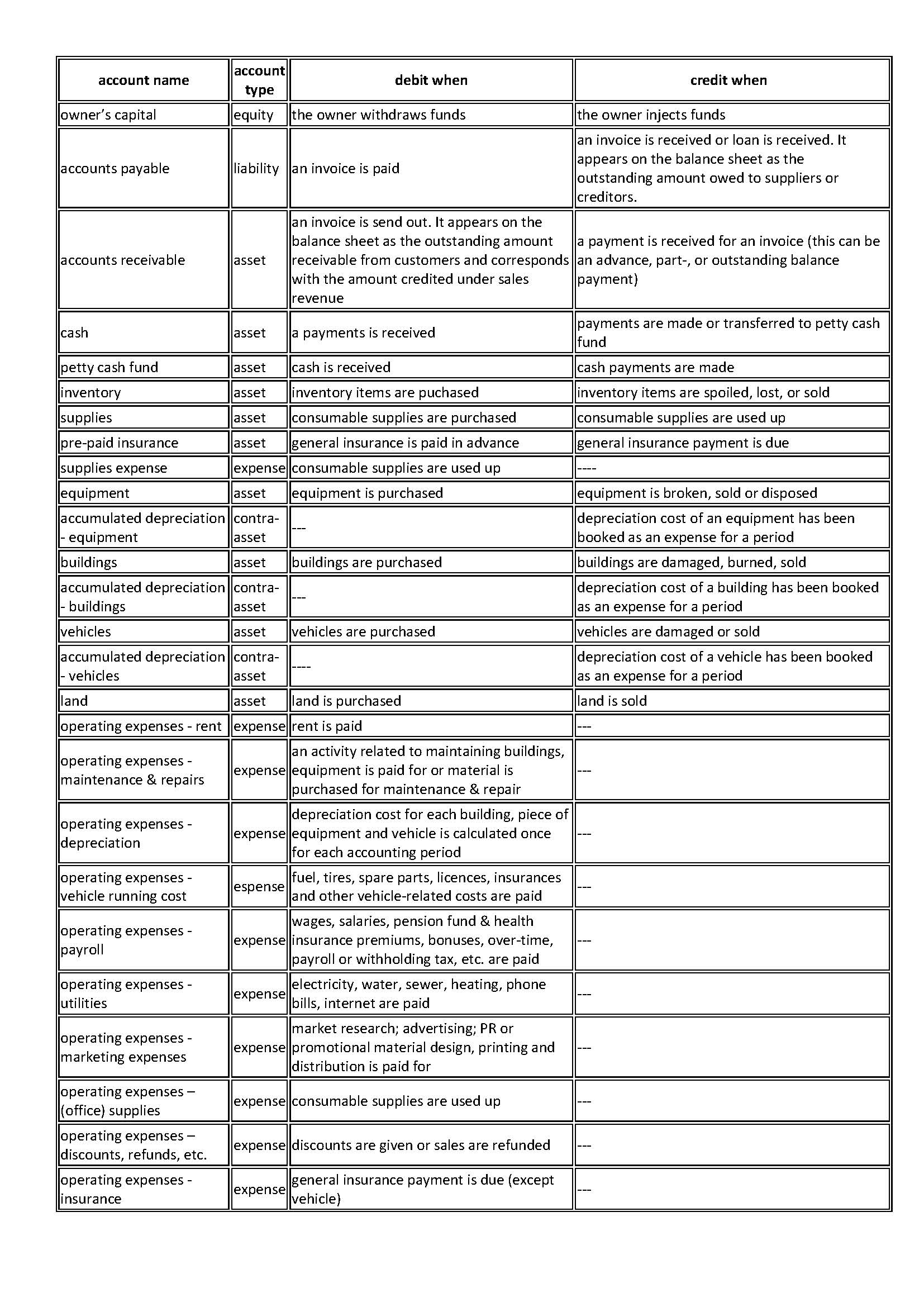
6. Setting up the accounts
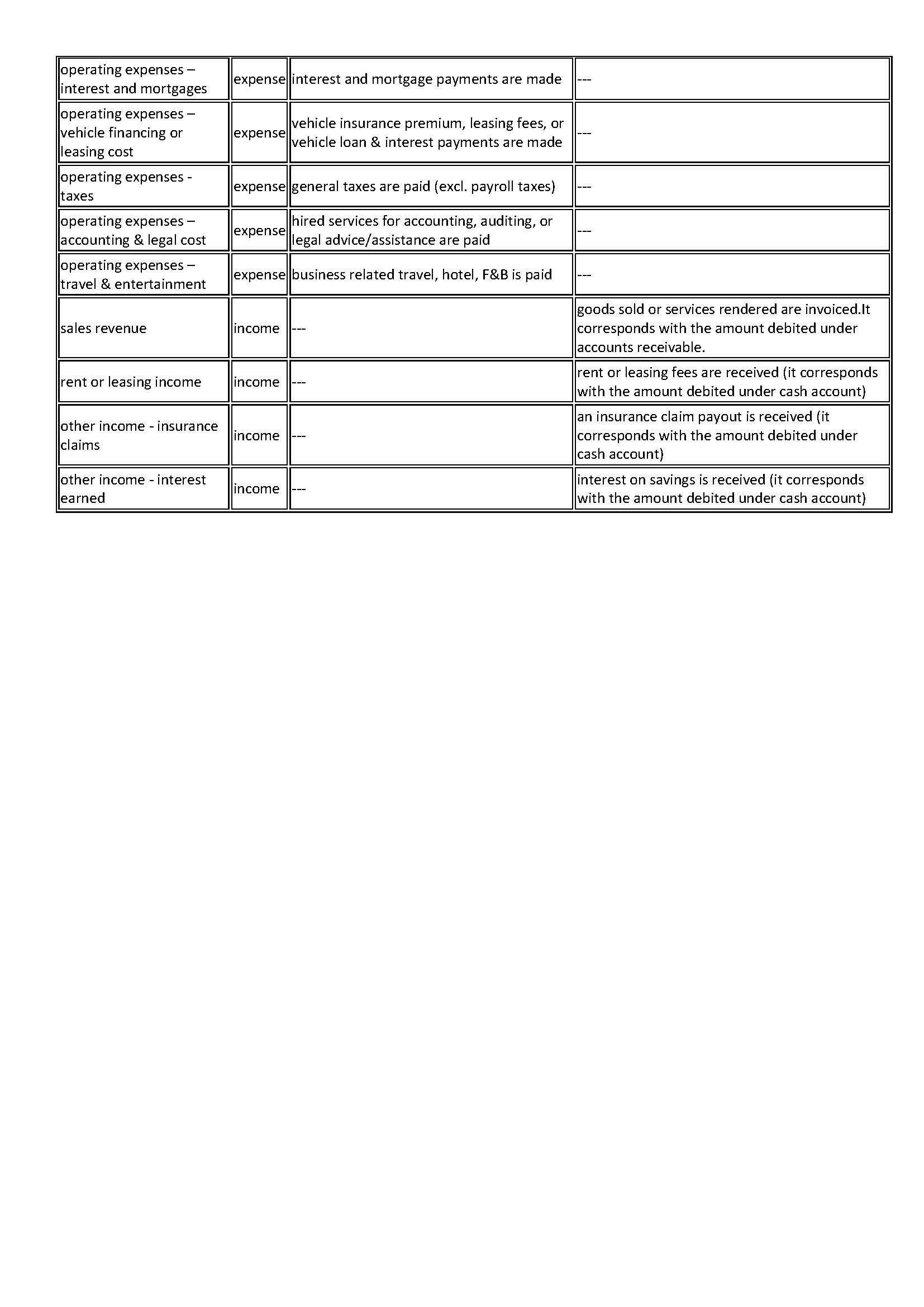
To keep your records, e.g. in a bookkeeping software, you have to set up
the different accounts that are involved in your transactions. Below is
a list of the usual accounts, how they are categorized, and how they are used:
7. Budgeting
Budgeting is the process of creating a plan to spend your money. This spending plan is called a budget. Creating this spending plan allows you to determine in advance whether you will have enough money to do the things you need to do or would like to do. Budgeting is simply balancing your expenses with your income. Imagine a budet to be your income in cash, that you devide into several envelopes, of which each represents a budgetline. When spending money you remove the amount from the corresponding envelope. Once it is empty you can no longer spend in the category of that envelope, unless you take the money from another envelope. You need to be aware that higher than planned spending does not increase the income, but tightens the budget in other areas.
To help you setting up a budget you can find a simple excel budgeting template under resources.
The process of budgeting involves several steps:
1. Setting your goals: how much do you want to earn?
2.
Identify income and expenses. In order not to forget any expenses it is
best to follow the pattern of your expense accounts. On the income side
it is advisable to work with conservative estimates, while on the
expense side you should also include possible seasonal expenses,
emregencies, and unforseen contingencies. Be realistic!
3.
Design your budget. Devide the expected income accross the areas where
you expect expenses. Allocate sufficient amounts but make sure to stay
within the total available amount. It might be necessary to devide needs
from wants and to prioritise on the critical areas.
At this point you can already see if your expected income and spending match, or if it will be difficult to maintain the needed cash-flow. Identify areas of high spending and work on ways to reduce cost. On the other hand you might also think of ways to increase income, preferably stable, reliable and regular income (like rent, salary, subscription fees, etc.).
May be your expected income is seasonal, but your spending is expected to happen on a daily or monthly basis. Plan your budget in such a way that you are able to bridge the times with no income and distribute your income over the entire period of no income. The risk of high seasonal income is the temptation of overspending at the time and running into cash-flow problems later on. In that case you might want to set up a monthly rather than an annual budget planner.
4. Once you have balanced your budget and decided on your income and spending goals, it is time to put your budget plan into action. Enter your income and expenses on a very regular basis to always have an accurate picture of the status quo. In case you have to overspend a particular budget line, decide out of which other budget line(s) the amount will come and reduce those accordingly, to avoid overspending. After practicing your budgeting for several month you might need to review your budgetlines and adjust the amounts to your real spending and income. Otherwisem try to stick to your budget as much as possible to ensure reaching your earning goal while spending primarily on the critical areas of your business.
8. Inventory
The inventory of a company are the raw materials, any work-in-progress,
as well as finished goods. It may also include merchandise materials that are kept in storage for regular or later use.
It
is advisable for any business not to bind up too much cash in inventory
items, but to ensure a fast and regular turnover. To manage the
inventory efficiently it is important to have accurate sales forecasts,
lean and secure supply chains and a good overview of inventory items in
stock. Long storage times can lead to spoilage, high storage costs or
even loss of value, in case an inventory item becomes obsolete.
In food industries inventory items (and also often supplies) are managed following the FIFO
system (First in- first out), to ensure the freshness of the product.
This means any item that was stocked earliest, is the first to be used
up, processed or sold.
Software-based
inventory systems can also be based on expiry dates of items and raise
alerts, when an item is near it's best before date.
In any case, inventory items need to be identifyable to be able to manage their use efficiently. Items that are going through processing also need to be identifyable throughout the entire process for reasons of tracebility. Therefore, each item should receive a unique or batch number when entering the system. This can be starting at farm level or at facility gate level. Batch numbers should be able to identify the source, from which the item was received (supplier code), the item itself (item code), the date it was received (or sequencial number that indicates the order of receipt) and the location at which the item is kept (e.g. warehouse number, warehouse table/shelve, cold storage chamber, crate number, etc.)
Example: 02-12-22/F005/S338/CC3-CR24
Date received: 2nd December 2022
Item code: F005 = Fruit - mangoes
Supplier code: S338 = Senegal - Ammadou Diallo
Holding info: CC3 = cold chamber no. 3; CR24 = crate no. 24
This can be printed as a QR code and attached to the crate:

with
a simple QR-code scanner on a mobile device the information in the code
can be easily retrieved. This batch number or QR-code stays with the
product throught the processing steps and even when the finished product
is sold.
In your inventory ledgers this information would appear as follows:
1. on receipt:
| serial number | date of receipt | Item code | supplier code | holding info | crate No. | amount in kg | price/kg in $ |
| 00001 | 01.12.22 | F005 mango, other | S112 - Senegal Francois Ndiaye | CC2 | 21 | 530 | $ 0.43 |
| 00002 | 02.12.22 | F005 mango, other | S335 - Senegal Ammadou Diallo | CC3 | 24 | 420 | $ 0.47 |
| item code | F005 | ||||||||
| date | Qty received in kg | serial number | price/kg in $ | total in $ | issued date | issue No | issued. amount/kg | balance in kg | issued in $ |
| 01.12.2022 | 530 | 00001 | $0.43 | $ 227.90 | 530 | ||||
| 02.12.2022 | 420 | 00002 | $0.47 | $ 197.40 | 950 | ||||
| 02.12.2022 | 00001 | 02.12.2022 | 764 | 280 | 670 | $ 120.40 |